 US log in
 UK log in
Work in progress
Hours recorded, billed and still unbilled, by fee earner, with targets and utilization.
What this report answers
Open Work in progress to see how much time each fee earner records, how much of that time is billed and how many billable hours are still unbilled. Use the Fee earner performance tab to compare people with their adjusted targets and see the current value of unbilled time.
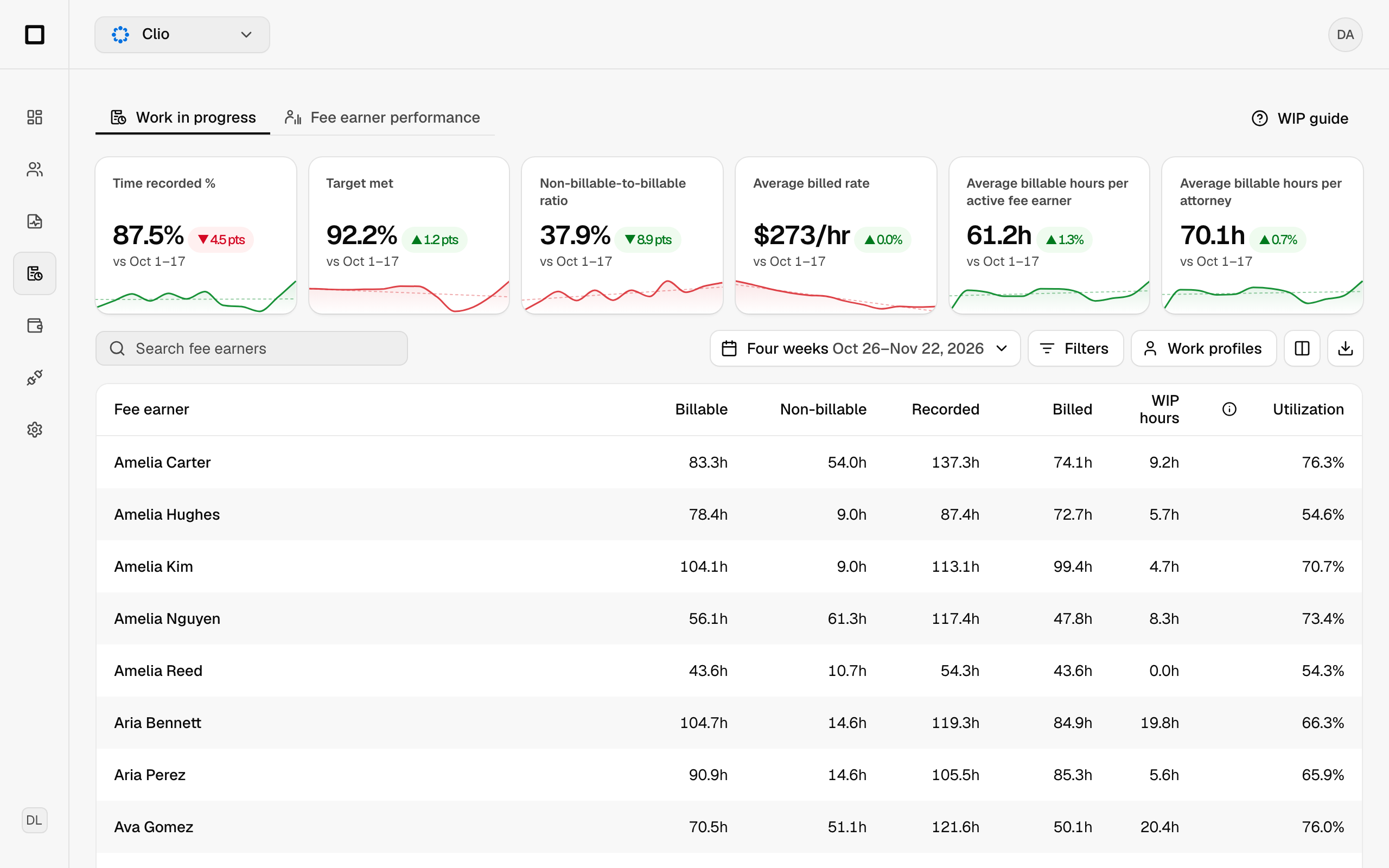
WIP guide opens definitions for the two tabs and their measures.
Time recorded % is the first summary card. Select a card to open its chart.
Filters narrows the table.
Fee earner identifies the person each row measures.
Cards
All six cards show month to date through the latest published day, using your firm's reporting calendar. Each compares with the same days of last month, ending at the last day of that month if it is shorter. If the latest day is March 12, the comparison is March 1–12 against February 1–12. The table's dates, search and filters leave the card totals as they are. See Report periods.
In a quiet month, recorded hours can be zero. A rate or average that has nothing to divide by can show a dash. The first three cards compare in percentage points. For example, 75.0% to 80.0% is an increase of 5.0 points. The billed rate and the two hours averages show percentage changes.
Time recorded %
Add up billable and non-billable hours recorded in the period. Divide by the available hours for people included in planning. If your firm records 60 billable hours and 20 non-billable hours against 100 available hours, the result is 80.0%.
Target met
Divide the billable hours recorded in the period by the billable target hours for people included in planning. If your firm records 60 billable hours against a 75-hour planning target, it meets 80.0% of the target. You set available hours and planning targets in Work profiles.
Non-billable-to-billable ratio
Divide the non-billable hours recorded in the period by the billable hours recorded in the same period. If your firm records 20 non-billable hours and 80 billable hours, the ratio is 25.0%.
Average billed rate
Add up the value of billed time entries recorded in the period and divide by their billed hours. For example, $2,000 across 10 billed hours gives $200/hr. The dates refer to when the time was recorded.
Average billable hours per active fee earner
Divide the billable hours recorded in the period by the number of fee earners who recorded any billable or non-billable hours in the period. If 3 people record time and their billable hours total 90, the average is 30.0h. A person who records only non-billable time still counts toward the denominator.
Average billable hours per attorney
Add up the billable hours recorded in the period by attorneys on the roster at the period end. Divide by the number of attorneys on that roster, including attorneys with zero recorded hours. For example, 90 billable hours and 3 attorneys give 30.0h per attorney. The UK label is Average billable hours per solicitor.
The table
Open Columns to show Include in planning, Available hours per day and Billable target per day. These show the current work profile settings. Billed hours rate is also hidden by default on desktop. It shows billed hours divided by recorded hours. See Set up fee earners to review planning settings and targets.
Filters, dates and exports
- Open Four weeks to change the table's inclusive date range. The control shows the range you select.
- Use Search fee earners to find a person. Use Filters to choose Practice area, Fee earner or Fee earner type, or set a minimum or maximum for Available hours, Billable hours, Non-billable hours, Billed hours (work date), Utilization or Billed hours rate.
- Open a card to explore the measure in its chart. Use the chart's own filters to explore by practice area or fee earner.
- Select Work profiles, if available to your role, to open the settings for schedules and targets.
- Select Export, if available to your role, to download the table's published figures as an Excel workbook. It uses the selected table dates, search and filters.
The cards, charts, table and export use the same published time records. When figures differ, compare the dates and filters used to calculate them.
Common questions
Why does Billed differ from Clio or Smokeball?
Check whether your provider report uses the date the work was recorded or the date the invoice was issued. Here, Billed uses the work date. For example, time recorded in March and invoiced in April can appear in March's Billed column once invoiced. See Why numbers differ.
Why does WIP hours differ from Time WIP in Fee earner performance?
WIP hours measures the hours still unbilled from the dates you picked. Time WIP in Fee earner performance adds up the value of unbilled time across work dates. See Report terms.