 US log in
 UK log in
Home
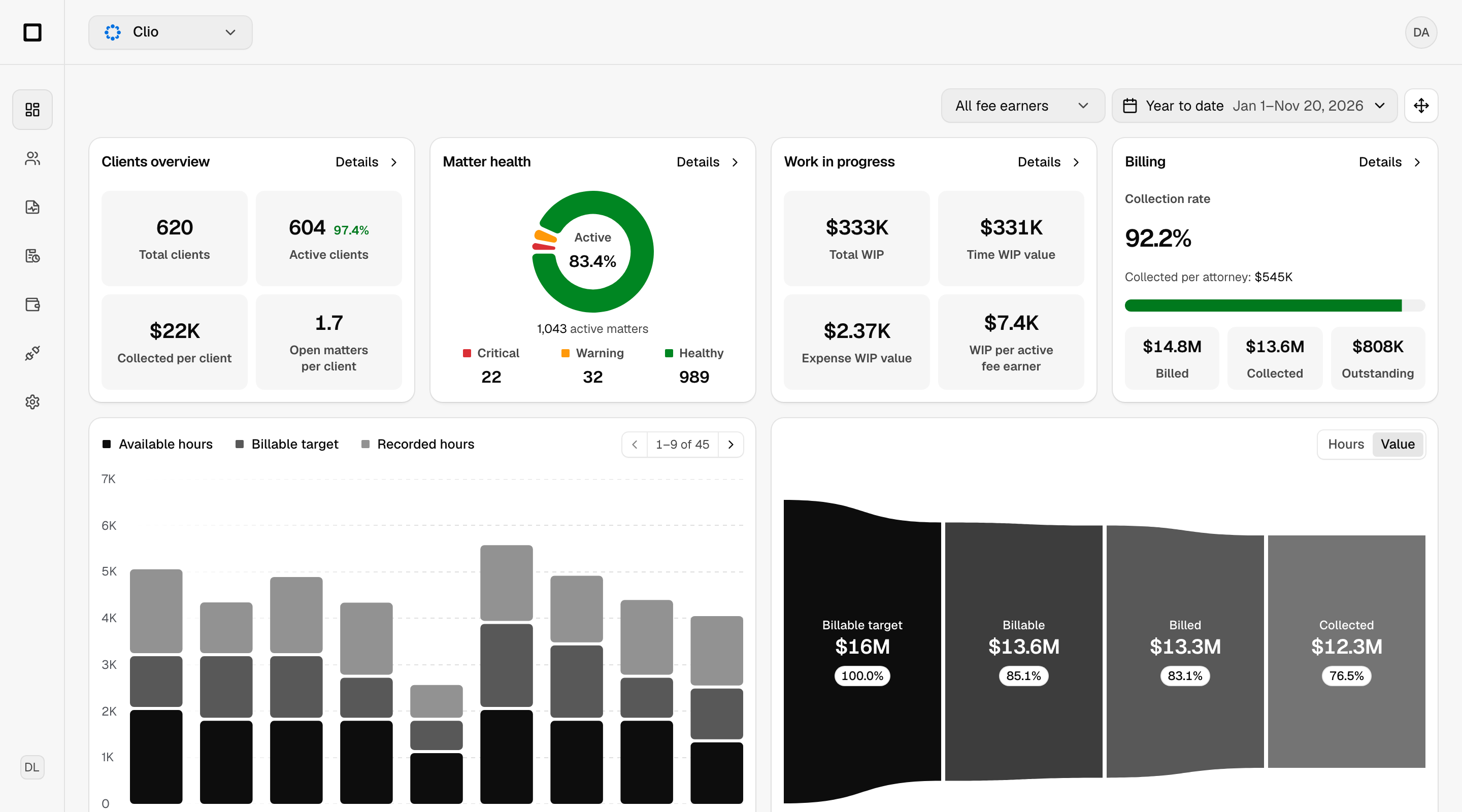
The firm at a glance: the cards at the top, what they cover and where each one leads.
What this report answers
Open Home to see your clients, open matters, unbilled work and billing in one place. Choose a reporting period at the top, then select Details on a card to open its report.
Year to date opens the date picker. The label changes with the period you select.
Clients overview shows how many clients you serve and how much you collect per client.
Matter health shows open matters and their health status.
Work in progress shows the value of unbilled time and expenses.
Billing shows amounts invoiced, collected and still owed.
Cards
The four top cards use Home's date selection. They show values for that selection without a previous-period comparison. Amounts billed and collected add up over the period. Work in progress and matter status use the end of the period where that history is available. See Report periods.
Clients overview
Total clients counts distinct clients. The default firm-wide Year to date view counts clients in your connected source. For other date ranges, it counts clients with recorded work, billing or receipts in the period. Active clients counts clients in the group with an open matter at the end of the period. The percentage beside it divides active clients by total clients. If 8 of 10 clients have an open matter, the percentage is 80.0%.
Collected per client divides the period's receipts by total clients. Open matters per client divides the open matter count by active clients. For example, $4,000 collected across 10 clients is $400 per client. Twelve open matters across 8 active clients is 1.5 open matters per client.
Select Details to open Clients.
Matter health
The Active percentage divides the count of open matters by the total matter count. If 15 of 20 matters are open, it shows 75.0%. The chart groups matters by Critical, Warning and Healthy status. Past periods can show Not available for past periods when the matter history does not support a reliable count or status.
Select Details to open Matter health.
Work in progress
Time WIP value adds up the value of unbilled billable time. Expense WIP value adds up unbilled chargeable expenses. Total WIP adds those two balances. For example, $1,000 in time plus $200 in expenses gives $1,200 in total WIP.
WIP per active fee earner divides total WIP by the active fee earner count. In the default firm-wide view, that count uses enabled fee earners with time entries. With $1,200 in WIP and 4 active fee earners, the result is $300 each. A date range that ends in the past leaves this average unavailable.
Select Details to open Work in progress, which tracks recorded and billed hours by fee earner.
Billing
Billed adds up invoices issued in the period. Collected adds up receipts dated in the period. Outstanding adds up what is still owed on invoices issued in that period. Collection rate divides collected by billed. For example, $8,000 collected and $10,000 billed gives 80.0%. Payment dates and invoice dates can fall in different periods.
Collected per attorney divides collected by the attorney count. For example, $8,000 collected divided by 4 attorneys gives $2,000 per attorney. The UK label is Collected per solicitor.
Select Details to open Billing.
The table
Home shows cards and charts. To see rows or change columns, select Details on the card for the report you want.
Filters, dates and exports
- Use the source selector at the top of Home to choose which connected source to view.
- Use All fee earners to focus on one person. If All teams is available, choose a team to narrow the scope and the list of people you can select.
- Open Year to date to pick a different date range. Home starts at Year to date and the four top cards use the range you choose. The report opened through Details receives that date range.
- Select Customize dashboard to move or resize cards. Select Save dashboard layout to keep your changes.
- For a spreadsheet, open Details and use Export in the report if your role has access.
The card and table may cover different dates after you open a report. Check the table's range and the comparison shown on the report cards. Report periods explains how those controls work.
Common questions
Why is the total different from Clio or Smokeball?
Check that you selected the same source, dates and people. Home uses invoice dates for billed amounts, payment dates for collections, and a period-end balance for WIP when the data supports it. See Why numbers differ for more checks.
Why can I collect more than I billed in a period?
A payment can arrive this month for an invoice you issued last month. That payment adds to Collected this month. The invoice adds to Billed in the month you issued it.