 US log in
 UK log in
Cash-flow forecast
When contingency matters are expected to close and pay, and how to fill in missing inputs.
What this report answers
Which open contingency matters could bring in money, and in which month? Use the forecast for Clio Manage or Smokeball if your firm bills on contingency or uses both hourly and contingency billing.
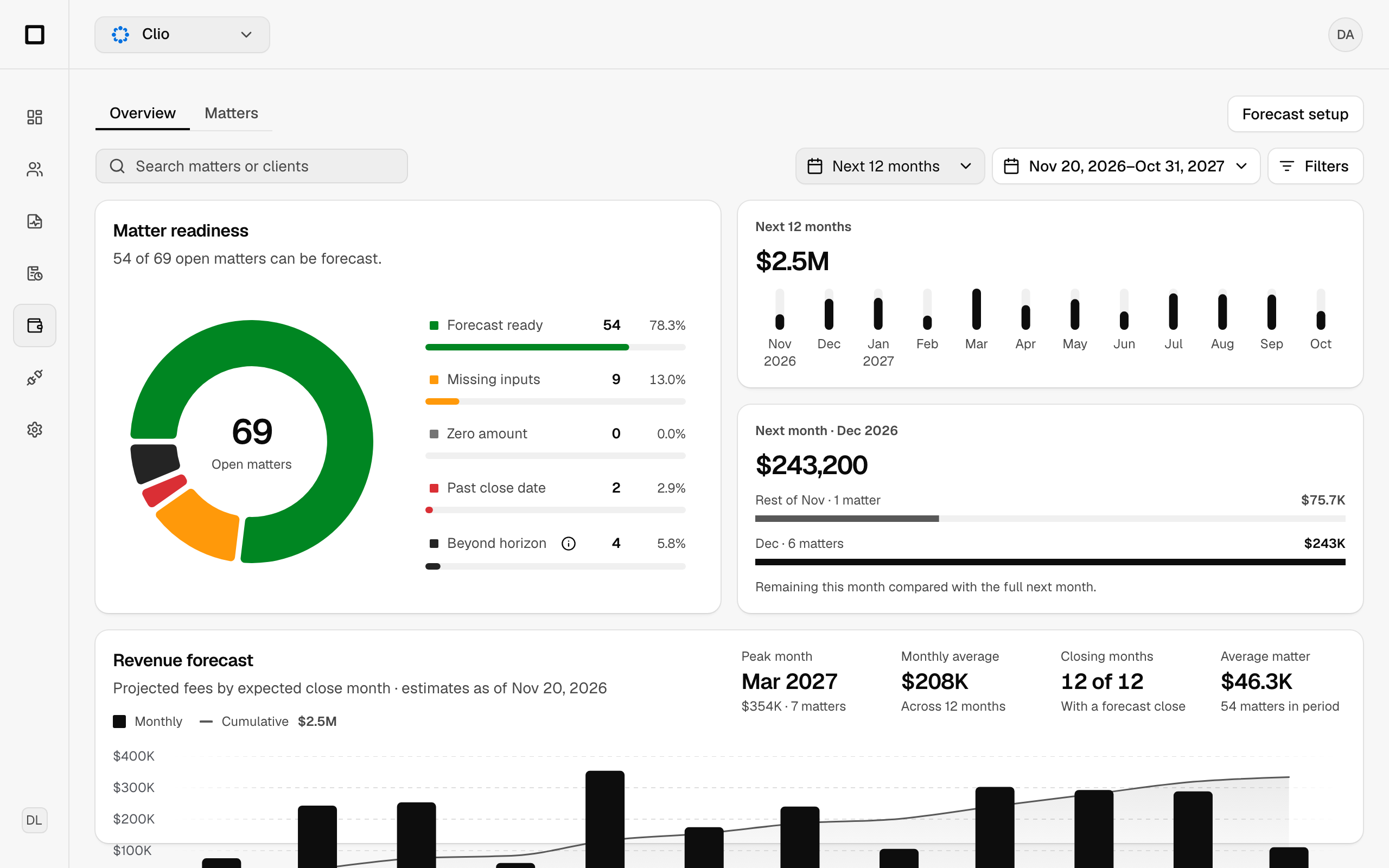
Matter readiness shows how many included matters have usable estimates.
Next 12 months totals the amounts expected from matters ready to close in that window.
Revenue forecast shows when those amounts fall in the period you select.
Cards
The first three cards use the default forecast, independent of the table filters and selected chart period. They look forward from the reporting date. See Report periods.
Matter readiness
Counts open, unsettled matters included in the forecast. In a contingency-only firm, open matters are included by default. In a mixed-billing firm, inclusion follows the forecast setup or the individual matter's Forecast inclusion choice.
The groups count each matter once. For example, a matter with a missing amount and a past date counts under Missing inputs.
Next 12 months
Adds projected amounts from the reporting date through the end of the twelfth calendar month, counting the current month as the first. Each ready matter contributes its amount once, in its projected close month.
Next month
Adds projected amounts for the full calendar month after the reporting date. The bars underneath compare the remainder of this month with all of next month.
Revenue forecast
Each Monthly bar adds the projected amounts for matters closing that month. Cumulative adds each bar to the months before it. If $10,000 closes in January and $5,000 in February, February's bar is $5,000 and the running total from January is $15,000. A month with no projected closes adds zero.
Peak month has the largest monthly amount. Monthly average divides the total by all months shown, including quiet ones. Closing months counts months with a projected close. Average matter divides the total by the number of matters contributing to it.
The table
Open Matters to inspect the inputs behind the forecast.
Originating fee earner and Open date start hidden. Open Columns to show them.
Fill a missing input
Open Matters → Filters → Data issue. Choose Missing amount or Missing close date. Open the edit button at the right of the matter's row.
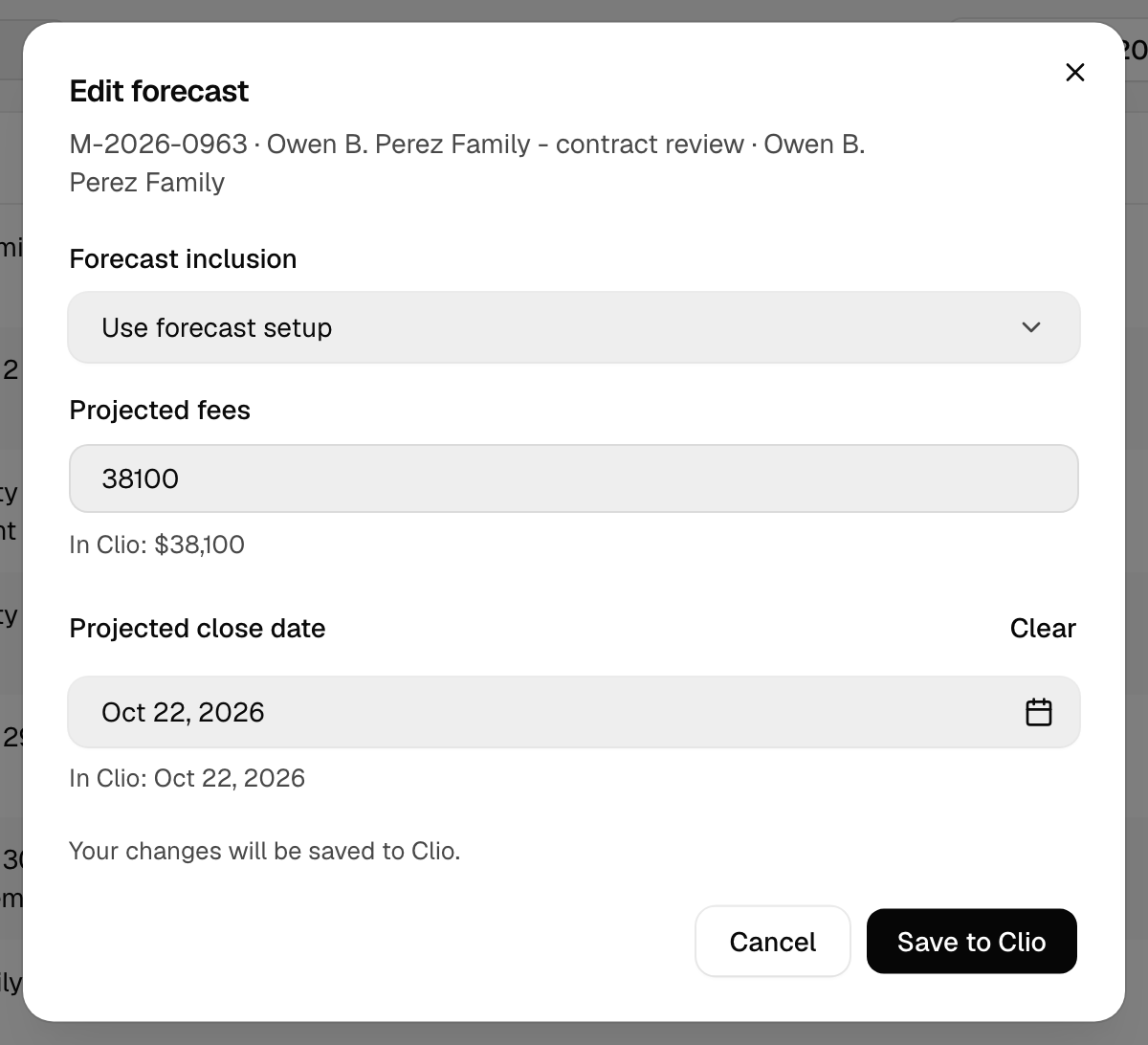
Projected fees takes the expected fee on a fee-based forecast. If your firm forecasts settlements, enter the projected settlement instead.
Projected close date takes the day you expect the matter to close.
For a dashboardWISE estimate, choose Enter in dashboardWISE where the editor offers a source, then Save forecast. Smokeball supports synced inputs and dashboardWISE estimates. Its forecast editor saves manual estimates in dashboardWISE.
Filters, dates and exports
Use the period control on Overview to change the horizon for Revenue forecast. A custom date range limits the results to matters with a projected close date in that range. Clear it to find matters missing a date.
Search by matter or client. Filters narrows results by practice area, fee earner, amount, open date or data issue. On Matters, Forecast status → Needs review finds included matters with missing inputs, zero amounts or past dates. Not included finds unclassified or excluded matters when that filter is available. The CSV export uses your table selection.
Common questions
Why is a matter missing from this month's total?
Check its inclusion, amount and close date in Matters. A positive amount with a future close date contributes in the month of that date. A matter marked Beyond horizon can appear in the chart if you extend the forecast period far enough.
Why does the forecast differ from Clio or Smokeball?
Check whether you are comparing a projected firm fee with a gross settlement. Also check the close date and whether the row shows a Manual estimate entered in dashboardWISE. See Why numbers differ.