 US log in
 UK log in
Matter health
Which matters are healthy and which need attention, and the rules behind each status.
What this report answers
Can the money held in trust for a matter cover its unbilled work and expenses? Use the health rating to find matters that need attention, then check which balance caused the rating.
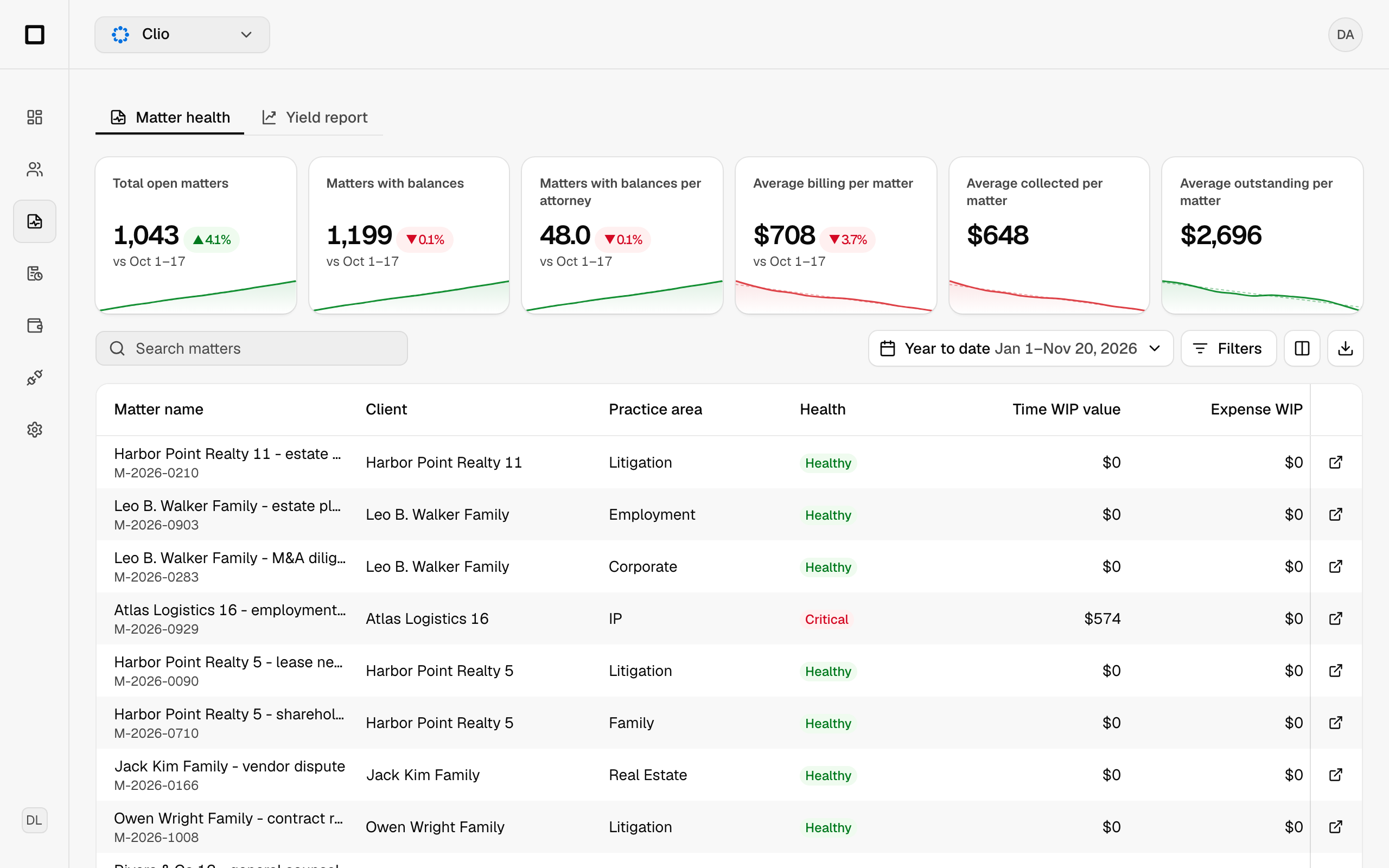
Total open matters counts matters across the firm.
Health shows how each matter's work in progress (WIP) compares with its trust balance.
Cards
The cards use the current month to date and compare it with the same days last month. Counts and balances use the end of each period. The three money averages use the number of open matters as their divisor. If there are none, they use the total matter count. See Report periods.
Total open matters
Counts the matters open at the reporting date, including those with no financial activity.
Matters with balances
Counts a matter once if any of these amounts is positive at the reporting date: WIP, trust, billed, collected or outstanding. A closed matter can count here, so this figure can exceed Total open matters.
Matters with balances per attorney
Divides matters with balances by the number of attorneys at the reporting date. For example, 60 matters across four attorneys gives 15 per attorney. In the UK the card says Matters with balances per solicitor.
Average billing per matter
Divides the amount invoiced during the period by the matter count. With $8,000 invoiced and 20 open matters, the average is $400.
Average collected per matter
Divides the money collected during the period by the matter count. With $6,000 collected and 20 open matters, the average is $300.
Average outstanding per matter
Divides the unpaid invoice balance at the end of the period by the matter count. With $2,000 unpaid and 20 open matters, the average is $100.
The table
All available columns start visible on desktop. On a phone, open Columns to show Client or Practice area.
How the rating works
When trust is positive, divide total WIP by the trust balance. With the default thresholds and $1,000 in trust, the ratings are:
When trust is zero or negative, any positive WIP is Critical. If WIP is also zero or negative, the matter is Healthy. Unavailable means dashboardWISE lacks the information to calculate WIP for that date.
Your firm can change the two percentages in Settings → Matter health. See Firm settings.
Filters, dates and exports
The table starts on Year to date. Select the date control to change the period. Use Search matters or open Filters to narrow by health, client, practice area or a range for any WIP or trust balance. The Excel export follows the table's selection. The cards keep their own dates and filters.
Common questions
Where is the yearly view?
Open Yield report beside Matter health to see hours by matter and year. The former yearly view opens this report. See Yield report.
Why does a balance differ from Clio or Smokeball?
Check the date at the end of the table's period. Work that was unbilled on that date can already be invoiced when you open the matter today. See Why numbers differ.