 US log in
 UK log in
Fee earner performance
How each fee earner is doing against their targets, and what counts towards them.
What this report answers
Open Work in progress → Fee earner performance to see who is meeting their billable targets and how much billable time they record and invoice. Use the table for a specific period and the Time WIP card for the value of unbilled time across work dates.
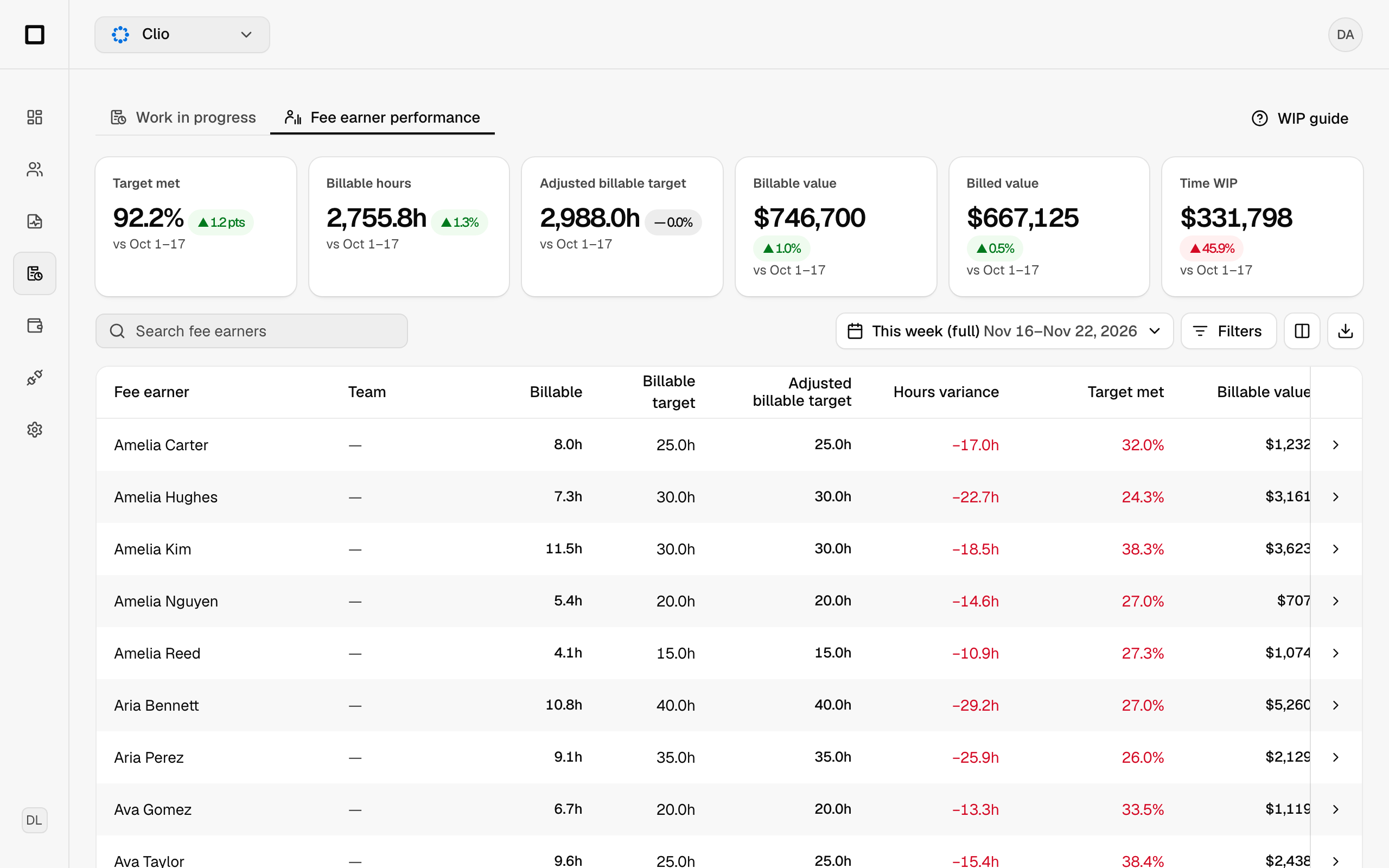
Fee earner performance opens the target and value report.
Target met is the first summary card. Select a card to open its detail.
Filters narrows the people in the table.
Fee earner identifies the person each row measures.
Cards
The cards use month to date through the latest published day, in your firm's reporting calendar. They compare with the same days of last month, stopping at that month's end if it is shorter. For example, March 1–12 compares with February 1–12. Time WIP compares the current balance with the balance at the previous endpoint. The table's dates, search and filters leave the cards as they are. See Report periods.
Card totals start counting each fee earner on the earlier of their work profile start or provider join date. If neither date is available, they start on the first recorded work date.
In a quiet month, totals for hours recorded and values recorded or billed can be zero. A missing figure shows a dash.
Target met
Divide total billable hours by the total adjusted billable target for the period. If the people in scope record 80 billable hours against a combined adjusted target of 100 hours, the card shows 80.0%. When the target is zero, the percentage is unavailable. The change is in percentage points.
Billable hours
Add up all hours recorded as billable during the period, including work that has since been invoiced. See Report terms.
Adjusted billable target
Add up scheduled billable target hours for the period and subtract applicable reductions such as leave. If the work profile calls for 6 billable hours on each of 5 working days and a leave adjustment reduces that target by 6 hours, the adjusted target is 24.0h. See Set up fee earners for work profiles and adjustments.
Billable value
Add up the value of billable time recorded during the period. Ten billable hours valued at $200 per hour add $2,000, including any of those hours you already invoiced. See Report terms.
Billed value
Add up the value of time on valid invoices issued during the period. Expenses are excluded. If you invoice $1,200 of time and $100 of expenses in April for work recorded in March, $1,200 counts toward April's billed value.
Time WIP
Add up the value of currently unbilled billable time across work dates for the fee earners in scope. Compare it with their tracked unbilled time balance at the prior endpoint, if that balance is available. For example, $800 of earlier unbilled time and $200 of new unbilled time give a current balance of $1,000. Expenses are excluded.
The table
On a phone, Team starts hidden. Use Columns to show it or change which optional columns you see. Scroll the table sideways to see columns beyond the edge.
Filters, dates and exports
- Open This week (full) to choose the table dates. The table counts both ends of the range. Full-period targets include scheduled workdays later in the selected period.
- Use Search fee earners or open Filters to select Fee earner, Fee earner type or Team when team choices are available.
- Select a card to inspect the measure with its own chart or detail controls. Select a linked figure in a fee earner's row to see its underlying activity.
- Select Export, if available to your role, to download an Excel workbook using the table dates, search and filters.
The cards, charts, table and export use the same published activity and target data. When figures differ, compare the dates and filters used to calculate them.
Common questions
Why do the hours or values differ from Clio or Smokeball?
Check the source and date range. Billable and WIP hours use work dates, Billed hours and Billed value use invoice dates, and Collected uses payment dates. A March entry billed in April belongs to different months in the billable and billed columns. See Why numbers differ.
Why does my table target differ from the card target?
The table uses the full period you picked, including later scheduled days in that range. The card uses the month so far. For example, if you pick a full week on Monday, the table includes the rest of the week's scheduled target. Use Set up fee earners to check schedules and dated reductions.